I’ve been watching the AI developer tooling space closely for the past couple of years, and Claude Code is one of the few tools that genuinely changes how serious engineering gets done. Not the way vendors pitch it — not the polished demo — but in the way it alters the daily rhythm of a working engineer.
But here’s what nobody tells you upfront: Claude Code is not a smarter autocomplete. It’s a workflow orchestrator. It reads your files, runs your tests, executes commands, fetches pages, and iterates until something passes. That’s a fundamentally different kind of tool, and most developers are still using it like it’s a fancy Copilot.
This article is based on a detailed analytical research report on Claude Code’s official documentation, community discussions on Hacker News and Reddit, GitHub issues, enterprise case studies, and Anthropic’s own published best practices. I’m going to give you the real picture — the what, the why, the tradeoffs, and the exact patterns that separate developers who get results from those who just get frustrated.
If you’re using Claude Code or planning to, read this carefully. The difference between using it correctly and using it badly isn’t minor. It’s the difference between a 10x productivity boost and a tool that ruins your day.
Understanding What Claude Code Actually Does
Before diving into best practices, you need to understand the model. Anthropic’s official documentation describes Claude Code as operating in an explicit loop: gather context → take action → verify results. The loop repeats until the task is complete, and you can interrupt it at any point.
What this means practically is that the agent is not just generating text. It’s using tools — file operations, search, shell execution, web fetching, and code intelligence — and the result of each tool call feeds back into its next decision. Every action Claude Code takes is informed by real output from your environment: test results, linter errors, compiler feedback, screenshots.
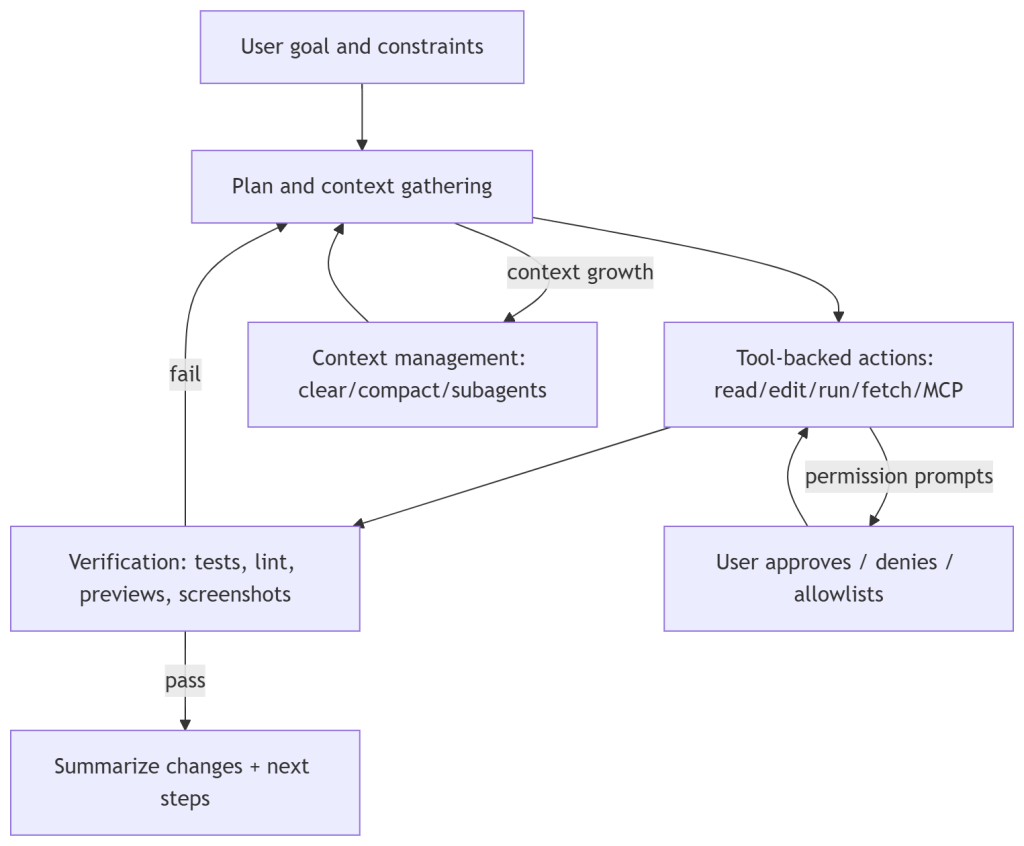
This is important because it changes how you should design your prompts. You’re not asking it to write code. You’re asking it to execute a workflow. That’s a meaningful distinction, and almost everything else in this article flows from it.
The research report draws a sharp line here: Claude Code is not a completion tool, it is an orchestrator that relies on your environment as its feedback channel. If you’re not giving it good feedback channels — tests, linters, expected outputs — you’re undermining the very mechanism that makes it work.
Verification Is the Highest-Leverage Investment You Can Make
Anthropic’s own best practices guide calls verification the single most leveraged intervention you can make when working with Claude Code. The exact framing: include tests, screenshots, or expected outputs so Claude can self-check.
This is where most developers go wrong. They write prompts that describe what they want but don’t tell Claude Code how to know when it’s done. That’s like asking a contractor to build a shelf with no measurements and no way to test whether it holds weight.
A well-designed prompt for Claude Code looks like this: it has an explicit task, it has pass/fail conditions, it has commands to run, and it specifies the expected artifacts. Here’s what that looks like in practice:
“Fix the failing auth tests. Success criteria: npm test passes, no changes to the public API surface, regression tests cover the root cause. Process: reproduce locally, propose a plan, implement in small commits with tests after each one, summarize the root cause and prevention steps.” — Verification-first prompt structure from Anthropic’s best practices docs
Notice the structure. It’s not just a goal. It has constraints, a defined process, and explicit verification. Claude Code then uses your test runner as a feedback loop and iterates until the conditions are met.
If you’re not designing prompts this way, you’re leaving the majority of Claude Code’s value on the table. The research report confirms this directly: the core loop depends entirely on verification quality.
Types of verification that work well
- Test suites — run npm test or pytest and let the output drive iteration
- Linters — ESLint, Pylint, or whatever your team uses; failures give Claude Code precise targets
- Screenshot diffing for UI changes — attach the expected screenshot and ask Claude to compare
- Compiler output for statically typed languages — type errors are precise, structured feedback
- Benchmark numbers — useful for performance-focused tasks where you want measurable improvement
The consistent principle across all of these: give Claude Code a structured signal it can act on, not vague human judgment.
Context Economics: The Hidden Cost Nobody Talks About
There’s a problem that scales linearly with how much you use Claude Code: context window bloat. Anthropic’s own documentation warns that long sessions can consume tens of thousands of tokens and can cause the model to start forgetting earlier instructions or making increased mistakes as the context fills.
This is one of the least-discussed issues in the community but one of the most expensive in practice. Every tool call, every file read, every test output — it all adds to the context. Once you’re deep into a long session, you’re paying premium token rates for a degraded experience.
The research traces this problem across community discussions on Hacker News and developer forums. Users report unexpected behavior late in long sessions, context-related cost spikes, and the agent losing track of earlier constraints.
Practical strategies for managing context
The CLAUDE.md file is your primary tool here. It’s a project-level instruction file loaded at session start. Anthropic’s documentation recommends keeping it under 200 lines, modularizing it with imports, and focusing only on high-signal information: how to build and test, the architecture map, and critical guardrails.
Here’s what a minimal, high-signal CLAUDE.md looks like:
“Build & test: Run ‘make test’ for fast runs, ‘make test-all’ for CI parity. Architecture: /api for HTTP endpoints, /core for pure domain logic, /infra for DB and external services. Guardrails: use Plan Mode for refactors touching /core, prefer small diffs, never log secrets.” — Example CLAUDE.md structure from Anthropic’s memory documentation
That’s it. Short, precise, actionable. You don’t need a novel. You need enough context for Claude Code to operate in your codebase without asking obvious questions.
Beyond CLAUDE.md, there are three commands worth internalizing: /clear resets the context between tasks, /compact compresses the current context with explicit summary instructions, and subagents spin up fresh context windows for subtasks and return only their results — significantly reducing main-session bloat.
The practical rule: clear between distinct tasks, don’t let a single session run indefinitely, and use subagents for anything that can be parallelized or isolated.
Permissions and Security: Stop Treating Them as Friction
The single most common complaint about Claude Code across Hacker News, Reddit, and GitHub is permission prompts. Users report getting hit with permission requests constantly and gravitating toward full permissions just to get uninterrupted work done.
I understand the frustration. But treating permission architecture as friction rather than policy is how you end up with an agentic system doing things you didn’t intend — or worse, things you can’t reverse.
Anthropic’s security documentation is unusually direct on this: Claude Code defaults to strict read-only permissions and prompts for approval when running commands or writing files. This is intentional. Anthropic’s own threat intelligence reports describe documented misuse of agentic tools for autonomous operations that executed approximately 80 to 90 percent of all tactical work independently. That should calibrate your thinking about what full permissions actually means in practice.
The permission architecture you should actually use
There are three permission modes worth understanding. Plan Mode prevents file modifications and command execution entirely — it’s analyze only. This is your default for new or complex tasks. AcceptEdits allows file changes but not command execution. BypassPermissions removes all guardrails; the official documentation explicitly warns against this and enterprise admins can disable it for managed deployments.
Beyond modes, you have fine-grained allow/deny rules. Here’s a practical configuration that most developers should be running:
“Allow: Bash(npm test *), Bash(npm run lint). Deny: Bash(curl *), Read(./.env*), Read(./secrets/**). Default mode: plan.” — Illustrative permission rules from Anthropic’s settings and permissions reference
The logic: allowlist the commands that are safe and common (running tests, linting), explicitly deny risky patterns (curl, reading secrets), and default to Plan Mode so you review before any changes land.
For unattended operation — when you want Claude Code to run without supervision — Anthropic provides a development container reference setup that hardened the environment while safely bypassing prompts. The caveat is explicit: even in a devcontainer, malicious repositories can exfiltrate anything accessible inside the container, including credentials. Use this for trusted repos only.
The community-reported pattern of ‘unsafe convenience’ — defaulting to full permissions because prompts are annoying — is a solved problem. The solution is to invest thirty minutes configuring allowlists and a sensible default mode. That investment pays off every day.
Plan Mode Is Not Optional for Complex Work
Plan Mode deserves its own section because it’s underused. When you launch Claude Code in Plan Mode, it can read your codebase, propose a complete plan, and show you exactly what it intends to do — without touching a single file. You review the plan, approve it, and then let it execute.
This is not just a safety feature. It’s a quality feature. Plans surface misunderstandings before they become bugs. They let you steer the implementation direction before expensive work gets done. And for senior engineers, reviewing a plan is a much faster feedback loop than reviewing a diff after the fact.
Anthropic’s best practices guide positions Plan Mode and checkpoints (which let you rewind file edits to any point in the session) as governance primitives — the tools you use to maintain control over an autonomous system without micromanaging every step.
Use Plan Mode as the default on any task that touches critical paths, refactors shared code, or operates in an unfamiliar part of the codebase. Drop into a more permissive mode only when you understand exactly what Claude Code will do and why.
Scaling to Teams: CLAUDE.md, Plugins, Hooks, and Organizational Policy
When Claude Code moves from individual developer to team or organization, the challenges shift. You’re now managing consistency across multiple people, multiple machines, and potentially multiple repositories. The tools Anthropic provides for this are CLAUDE.md scope hierarchies, plugins, and hooks.
CLAUDE.md scope hierarchy
CLAUDE.md files can exist at multiple scopes: managed policy (set by administrators), project-level, user-level, and local. More specific scopes take precedence. This lets you centralize non-negotiable guardrails at the policy level while allowing developers to customize their local experience.
For teams, the recommended pattern is: put architecture documentation and critical guardrails at the project level, let individual developers maintain personal preferences at the user level, and use managed settings for compliance requirements.
Plugins and skills as reusable workflow units
Plugins package slash commands, agents, MCP server configurations, and hooks into distributable units. The intent — as described in Anthropic’s plugin announcement — is to standardize setups across teammates and reduce the overhead of configuring Claude Code from scratch on each machine.
In practice, this means if your team has a standard way of running security reviews, generating migration scripts, or scaffolding new services, those workflows should live in a plugin. Anyone on the team can then invoke them with a slash command rather than writing the same prompt from memory each time.
Hooks for automation and enforcement
Hooks fire at lifecycle events — before a tool runs, after it completes, on session start. They can block actions, automate approvals, and enforce guardrails that would otherwise require constant human attention.
A simple but powerful example: a post-edit hook that automatically runs your test suite and linter after any file changes. This closes the verification loop without requiring you to explicitly ask Claude Code to verify its work each time.
The research report frames this as treating CLAUDE.md for stable conventions, plugins for reusable workflows, and hooks for enforcement and automation. That’s a clean mental model worth adopting.
MCP Servers: Power and Risk in the Same Package
Model Context Protocol servers extend Claude Code’s tool access — connecting it to external services like databases, APIs, communication platforms, and cloud providers. The potential here is significant. Anthropic’s internal case material describes teams using MCP servers for everything from Slack-integrated incident management to automated ad generation at scale.
The risk is equally significant. Anthropic’s costs documentation warns that MCP overhead adds token cost on every request. More importantly, third-party MCP server documentation includes explicit warnings about trusting external servers — each one is a potential attack surface.
MCP best practices that actually reduce risk
- Keep the list of active MCP servers minimal — disable any server not actively needed for the current task
- Centralize .mcp.json configuration at the organization level so everyone runs the same vetted set
- Prefer CLI tools when a command-line equivalent exists — they add less overhead than an MCP server
- Rely on Claude Code’s built-in tool search for discovery rather than loading every possible server upfront
- Apply the same security review to MCP configurations that you’d apply to third-party npm packages
The community pattern of adding every available MCP server and leaving them all active is a reliable path to inflated costs, slower sessions, and unnecessary security exposure. Treat MCP servers as production dependencies — curate them carefully.
Non-Technical Users Are Already Here — and That Changes the Calculus
One of the more surprising findings in Anthropic’s own case material is how far Claude Code has spread beyond software engineers. The official ‘How Anthropic Teams Use Claude Code’ documentation describes finance staff with no coding experience running plain-text workflows, legal teams building internal tools, growth marketers generating and analyzing ads at scale, and security engineers handling incident debugging.
Brex reports usage spanning engineering leadership, data and analytics leads, and senior content designers moving into code and Figma plugins with Claude Code. Y Combinator startups describe building entire company workflows with explicit human approval steps wired in for risky actions.
This matters for technical practitioners because it changes what ‘best practices’ means. When the user base includes people who’ve never opened a terminal, the permission architecture, onboarding friction, and failure modes all take on new dimensions.
For non-technical users, the research report recommends a structured prompt template that mirrors what technical users do for verification:
“Goal: [what you want]. Inputs I can provide: [files, data, context]. Constraints: [time, compliance, tools]. What done looks like: [acceptance criteria]. Ask me before you: run commands that change data, publish anything, spend money. Deliver: a short summary, a checklist, a link or PR if code changed.” — Prompt template for non-technical Claude Code users, adapted from Anthropic’s organizational guidance
The structure forces scope clarity. Even without technical knowledge, this template gives Claude Code enough context to operate within sensible boundaries and gives the user a clear review point before anything consequential happens.
Cost Optimization: It’s More Than Just Using Fewer Tokens
Claude Code’s cost model scales with context size, and the costs documentation is explicit: long sessions with large contexts are expensive. But there’s a set of concrete interventions that meaningfully reduce cost without reducing capability.
Prompt caching is built in and automatic. Claude Code uses it by default when the same context is re-sent across multiple calls in a session. You don’t need to configure this, but you do need to understand that clearing context between tasks (which reduces cache efficiency) is still the right call when tasks are genuinely distinct — the context savings outweigh the cache benefit.
Model selection matters. Anthropic’s documentation describes a Fast Mode for certain operations where Opus’s full capability isn’t needed. Using a lower-cost model for routine tasks — formatting, documentation generation, simple refactoring — while reserving Opus for complex reasoning is a meaningful cost lever for teams with high Claude Code usage.
MCP overhead is real and measurable. The costs documentation explicitly notes that every active MCP server adds token overhead on each request. Disabling servers that aren’t in active use for the current session is a cost optimization as much as a security one.
Finally, the research report recommends enabling OpenTelemetry telemetry for any team running Claude Code at scale. The monitoring documentation describes exporting metrics and event logs via OTel protocols to centralized dashboards, giving you visibility into cost by user, by project, by tool activity. You can’t manage what you can’t measure.
The Challenges Nobody Has Fully Solved Yet
The research report is honest about gaps, and I want to be too. A few things remain genuinely unsolved in Claude Code’s current state.
Visual and interactive verification
Repeated feature requests across GitHub, Hacker News, and developer forums ask for real UI interaction — the ability for Claude Code to launch an app, navigate it like a real user, and spot visual regressions. Anthropic’s current best practice leans on screenshot-based verification, which is useful but limited. This is an acknowledged gap, not a solved problem.
Behavior drift as models evolve
Models change. Release notes include fixes for model resolution and configuration drift. Community discussions flag the risk of silent degradation — tasks that worked perfectly in one model version start producing subtly different output in the next. Telemetry via OTel helps with cost and activity metrics but doesn’t by itself catch semantic quality regression. This requires maintaining baseline benchmarks that you run when models change.
Onboarding for non-technical users at scale
The internal Anthropic and Brex stories demonstrate that non-technical adoption is real. But the practical UX challenges — terminal installation barriers, authentication paths that vary by deployment, platform prerequisites — are still significant. The web surface reduces some of this friction but community reports flag feature gaps and stability issues compared to the CLI. This remains a moving target.
The Bottom Line: Claude Code Rewards Investment
The developers who get the most out of Claude Code are not the ones who give it the fewest constraints. They’re the ones who invest in the scaffolding: good verification, clean CLAUDE.md files, sensible permission policies, and structured prompt templates.
Boris Cherny, head of Claude Code at Anthropic, has said that 100 percent of his code is written by Claude Code. That’s not a sales claim. It’s a demonstration that at the level of someone who deeply understands the tool, the productivity ceiling is extremely high.
You don’t get there by default. You get there by treating Claude Code as a system you configure and manage, not a black box you prompt.
The agentic loop — gather context, take action, verify results — only works as well as the inputs you give it. Give it tests, give it clear constraints, give it a structured CLAUDE.md, and let the loop do what it was designed to do.
If you found this useful, I cover AI engineering, SaaS architecture, and product development strategy in my newsletter at
If you found this useful, I cover AI engineering, SaaS architecture, and product development strategy in my newsletter at newsletter.swarnendu.de. Subscribe to get these insights directly — 210,000+ practitioners already do.
Key References and Further Reading
Claude Code official best practices documentation
Claude Code security architecture and permissions
How Anthropic teams use Claude Code
Claude Code memory and CLAUDE.md guidance
Claude Code monitoring and OpenTelemetry
Anthropic threat intelligence: AI orchestrated cyber operations
How Brex uses Claude Code for code quality and productivity
Building companies with Claude Code — Y Combinator stories